Since rising from the ashes in this new incarnation, I’ve said that I would skew away from the lecture-y, preacherly litany of the past. I’ll renege on that aspiration for one moment. These past few months have seen a barrage of cyber-attacks on game companies, plying for the sweet, succulent sensitive financial information of those of us who broadcast far too much about our personal lives on the internet every day. When we are lucky, they just make off with source code, which does not impact us consumers directly. But sometimes they get our information, too. Most recently, Ubisoft was the one who found itself in the crosshairs, as reported over on Game Developer, formerly Gamasutra. In this case, supposedly no player data was compromised. But far too many of us live cavalier lives in the face of rising cyberthreats, and are far too exposed to continue doing so.
Most of you streamers out there tell the world whenever you buy some new piece of gaming or production gear, mention where you bought it from, indicate what carrier delivered it, and let your followers and anyone else in earshot know how much you paid for it. Congratulations. You just divulged a honey pot of information sufficient for a bad actor to call and use that to corroborate the “last purchase made” question that is typically used to screen someone calling in to request a password or, far worse, an email address change to the one associated with the account. Most of the other information they need, you’ve divulged before; this would be the last peice. Trust for the security of these companies should be held with high skepticism, but I trust the people manning the customer service lines even less (sorry; you guys all do good work, but I doubt the average call-center person in the account access section has their Security+ or CISSP).
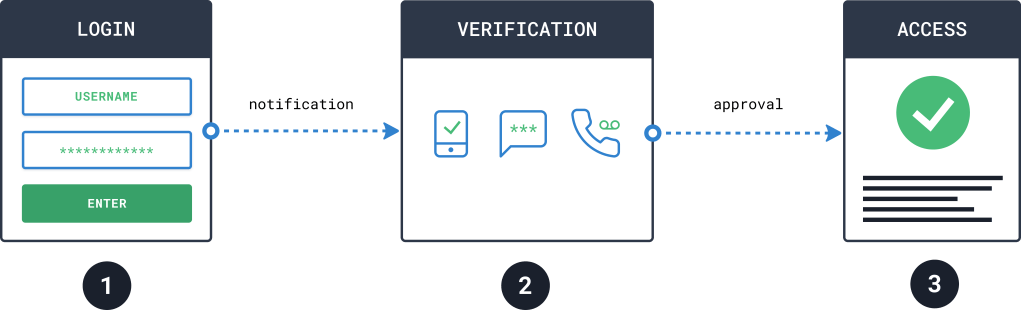
How long have most of you ignored the nagging message when logging in or the email entreating you to enable two-factor authentication? You typically use mad-obvi email addresses, typically some variant of your real name (which people have a habit of finding out), or your social-media handle or channel name plus at-gmail-dot-com.
Someone will guess that, and then combine it with that “qwe4rty7” password that you patted yourself on the back for for your ingenious trickery, but isn’t a strong password and will be easily toppled over by a brute-force effort.
While it is true that I am not a fan of the many behaviors that monetization drives in content creators (because it spawns many of the 🤡), I will encourage people to be more prudent about the security of things that drive their livelihood. Last time I checked (and maybe partners get bennies I don’t know of), YouTube and Twitch do not offer health care, life insurance, short or long-term disability, or, hell, even pet insurance or discounted legal service for its content creators, even if it’s what you do full time. If you lose access to one of these accounts or, worse, people use flow-across social engineering to gain access to multiple resources as the domino effect from knocking one account down (such as financial accounts you have tied to your gaming, social media, or content creation accounts), you’re farked, to say the least.
On this note, I will also mention that protecting yourself is not limited to password protection. The number of content creators who stream, game on, or otherwise create content from a PC that do not have a backup or disaster recovery solution or redundancy in place is staggering. The number of tweets I see about someone saying “No stream” or “My channel will be offline” because their PC is down hard slash crying emoji and has to be rebuilt, typically because the OS got borked, is far too many for people who are monetizing and reliant on daily interaction with their followers to maintain their revenue base. Or some of the even worse cases, like people who have serious physical repair problems with the location they stream from but refuse to get insurance….SMH.
If you are dependent on one PC, you need to be making a periodic image of that machine…a FULL image, not just incremental backups…or else it’s going to get painful when the bad happens. And when you upgrade, consider keeping your old rig around as a backup.

Back to passwords. Don’t just set up 2FA. Also consider using a password manager or a local encrypted vault. Some people don’t like password mangers and worry about the companies that own them and what happens when those LLC’s change hands. OK; fine. Local vault then. Better yet, get a physical key.
Two standard tenets to live by:
- If there are less than 3 copies of a thing, then you don’t have a backup (I’m leaving out the geographic separation, because mainly I am talking here about images to restore your PC and I recommend you just make full images and I wouldn’t worry about shipping those out to your cousin on the West Coast)
- Account security should be based on a thing that you know, and a thing that you have, so if your account is compromised by the first, they still cannot get in without having the latter in their possession
Cool? Cool. Now go play games.
 Rounding Off Infinity